Showing posts with label DBA. Show all posts

Tuesday, April 5, 2016

List users with DBA privilege


Which users having dba provilege assigned, query dba_role_privs in the SYS schema

SQL>  select * from dba_role_privs where granted_role='DBA';

Wednesday, March 9, 2016

Rebuild UNUSABLE Partition Indexes


Validate and generate rebuild script for partition indexes


Select 'ALTER INDEX '||INDEX_OWNER||'.'||index_name ||' rebuild partition ' || PARTITION_NAME ||';'  from DBA_IND_PARTITIONS Where  status = 'UNUSABLE'


Thursday, December 17, 2015

Generate Table and Indexes DDL using with dbms_metadata


Generate DDL with dbms_metadata

conn user/password

set pagesize 0
set long 90000
set feedback off
set echo off 

Spool ddl.sql

SELECT DBMS_METADATA.GET_DDL('TABLE',ut.table_name)
     FROM USER_TABLES ut;
SELECT DBMS_METADATA.GET_DDL('INDEX',u.index_name)
     FROM USER_INDEXES u;

Spool off

or you can use dual table for generating DDL

set heading off;
set echo off;
set long 90000;
 
spool ddl.sql
 
select dbms_metadata.get_ddl('TABLE','YOUR TABLE NAME','YOUR TABLE OWNER NAME') from dual;
 
select dbms_metadata.get_ddl('INDEX','YOUR INDEX NAME','YOUR TABLE OWNER NAME') from dual;
 
spool off;


Saturday, November 28, 2015

Dead Locks occured while applying patch# 21314548 R12.AD.B.DELTA.7 PATCH


Dead Locks occured while applying patch# 21314548 

sqlplus -s APPS/***** @/u02/app/oracle/PROD/apps/apps_st/appl/ad/12.0.0/patch/115/sql/ADFIXUSER.sql
Connected.
begin
*
ERROR at line 1:
ORA-00060: deadlock detected while waiting for resource
ORA-06512: at "SYS.AD_ZD_SYS", line 39
ORA-06512: at line 2


The error is a lock on object.

1. stop you patch application

2.  Stop and start your database

3. re-apply the patch .

Tuesday, November 3, 2015

Remove Special Characters from String


Remove Special Characters from a String

REGEXP_REPLACE('String for replace','[^[:alnum:]'' '']', NULL)

E.g

SELECT REGEXP_REPLACE('##787__!!','[^[:alnum:]'' '']', NULL) FROM dual;

787

Friday, October 16, 2015

Delete Duplicate Rows Based on a Column

There are so many ways available, but I used oracle analytic .

Use analytic to delete duplicate rows
You can  detect and delete duplicate rows using Oracle analytic functions:

delete from
   <<xxx_accounts>>

where rowid in
 (select rowid from
   (select
     rowid,
     row_number()
    over
     (partition by account_name order by account_name) dup
    from <<xxx_accounts>>
    )
  where dup > 1 )

Tuesday, December 31, 2013

How to delete a concurrent program in APPS

Oracle application allows creation of concurrent programs but does not allow deletion of the concurrent programs. Through form user can disable a concurrent program.

We can use API for deleting concurrent programs and executables:

Delete the concurrent program. The script is

BEGIN
   fnd_program.delete_program (program_short_name   =>'XXPMSJB',
                                                 application          =>'XXPMS');
   COMMIT;
END;

The above concurrent program is deleted and it cannot be queried.


The executable exists. It can be deleted also using PL/SQL,


BEGIN
   fnd_program.delete_executable (executable_short_name   =>'XXPMSJB',
                                  application          =>'XXPMS');
   COMMIT;
END;

Saturday, July 13, 2013

Cleaning FND_NODES Tables

Cleaning FND_NODES table

To clean the FND_NODES table use the following:

1. Shutdown all the services.
2. EXEC FND_CONC_CLONE.SETUP_CLEAN;
COMMIT;
EXIT;

run autoconfig on all the nodes starting with DB node.

Friday, September 28, 2012

Resizing or Recreating Online Redo Log Files

Online redo logs are sized too small causing database performance problems.

I had 11MB logfiles in each group.

I decided to increase the redo log file size to 100MB

The redo logs must be dropped and recreated for changing the redo log size. It can be done without shutdown the database. Redo group status must be INACTIVE before dropping.

There is a basic requirement in Oracle database that there should always be a minimum 2 redo log groups available with the database. So we can't drop any redo groups if there  are only 2 groups.

First we will see the current redo log files status
$sqlplus / as sysdba

SQL> select group#,bytes,status from v$log;

    GROUP#      BYTES STATUS
---------- ---------- ----------------
         1   10485760 ACTIVE
         2   10485760 CURRENT
         3   10485760 ACTIVE

To convert an group status to inactive , execute the checkpoint
SQL> alter system checkpoint;
SQL> select group#,bytes,status from v$log;

    GROUP#      BYTES STATUS
---------- ---------- ----------------
         1   10485760 ACTIVE
         2   10485760 CURRENT
         3   10485760 INACTIVE

The group 3 is inactive
Drop the 3rd group file using the following command

SQL> alter database drop logfile group 3;
Database altered

Re-Create dropped online redo log group

SQL> alter database add logfile group 3 (
'/u01/app/oracle/PROD/db/app_sts/PROD/log3a.dbf','/u01/app/oracle/PROD/db/app_sts/PROD/log3b.dbf''/u01/app/oracle/PROD/db/app_sts/PROD/log3c.dbf') size 512M
SQL> select group#,bytes,status from v$log;

 GROUP#      BYTES STATUS
---------- ---------- ----------------
         1   10485760 ACTIVE
         2   10485760 ACTIVE
         3   104857600 UNUSED

After adding the new log file, it status should become current. using the following command
SQL> alter system switch logfile;

SQL> select group#,bytes,status from v$log;

    GROUP#      BYTES STATUS
---------- ---------- ----------------
         1   10485760 ACTIVE
         2   10485760 ACTIVE
         3   104857600 CURRENT


Repeat the same steps for other 2 log files.


Monday, September 24, 2012

Revoke DBMS_JAVA permissions

Revoke dbms_java permission

Query the dba_java_policy table

$sqlplus / as sysdba
SQL>select * from  dba_java_policy

KING      GRANTEE TYPE SCHEMA TYPE NAME                NAME ACTION ENABLED    SEQ

GRANT XXPMS    SYS                java.io.FilePermission   *   read ENABLED 178
GRANT XXPMS   SYS                java.io.FilePermission   /-   read,write  ENABLED 181
GRANT XXPMS   SYS                java.io.FilePermission       /bin/ls   execute ENABLED 180


Using the SEQ value, you can run the following statement to revoke the granted java permissions

eg: suppose you want to revoke SEQ 178

begin
  DBMS_JAVA.disable_permission(178);
  DBMS_JAVA.delete_permission(178);
end;

ERROR: While GATHER_TABLE_STATS: ***ORA-20005: object statistics are locked (stattype = ALL)***

ERROR: While GATHER_TABLE_STATS: ***ORA-20005: object statistics are locked (stattype = ALL)***

Connect as a dba user and use the following statement to unlock the statistics:

sqlplus / as sysdba or sqlplus system/****

SQL>EXEC DBMS_STATS.UNLOCK_SCHEMA_STATS('SCOTT');

SQL>exec dbms_stats.gather_schema_stats('SCOTT',options=>'GATHER', estimate_percent => DBMS_STATS.AUTO_SAMPLE_SIZE, method_opt => 'FOR ALL COLUMNS SIZE AUTO', cascade => TRUE);


Sunday, September 9, 2012

Flashback version Between query in oracle

Flashback version between query used to track a table row in a specified time period

Syntax: VERSIONS BETWEEN TIMESTAMP [lower bound] AND [upper bound];

eg:
SELECT * FROM wf_notifications
VERSIONS  BETWEEN TIMESTAMP TO_TIMESTAMP('15-AUG-2012 08:13:07')
                                      AND TO_TIMESTAMP('15-AUG-2012 12:01:17')
        Where message_type = 'XXXX'
                                 

Tuesday, August 21, 2012

ORA-01927: cannot REVOKE privileges you did not grant

Means you didn't grant to the user.

use the follwing dba table to find out details of grant privleges

dba_tab_privs

Monday, May 7, 2012

Oracle RMAN Database Backup Failed: Error: "error writing input to command"

Oracle RMAN Database Backup Failed: Error: "error writing input to command"


Solution:

Set the permission to 6750 (nmo & nmb) 
$chmod 6750 nmo
$chmod 6750 nmb

Oracle RMAN Database Backup Failed: "ERROR: NMO not setuid-root"

Oracle RMAN Database Backup Failed:   "ERROR: NMO not setuid-root"

Solution:
Change the ownership of the following files to root.
nmo & nmb
$cd $ORACLE_HOME/bin
$chown root nmo
$chown root nmb 

Wednesday, May 2, 2012

Unusable State of Index

Unusable State of Index


Unusable state of indexes will cause poor performance of database.

How to find Unusable Index:
select Index_name from dba_indexes where status='UNUSABLE'

How to make index Usable:
alter index  <index name> rebuild

How to create above alter statement dynamically:
select  'alter index '||owner||'.'||index_name||' rebuild;' from dba_indexes where status='UNUSABLE'


Tuesday, May 1, 2012

How to kill an oracle session

How to kill an oracle session

conn as / sysdba or any dba user.

SQL> Alter system kill session  'sid,serial#' immediate;

OS level:


Windows:
orakill ORACLE_SID spid


The UNIX /Linux :
To kill the session on UNIX or Linux operating systems, first identify the session, then substitute the relevant SPID into the following command.

find out running oracle process
$ps -ef | grep ora

$kill -9 unix/linux process id


How to find a locked Objects in database

How to find a locked Objects in database

Run the following query from dba user

select c.owner, c.object_name, c.object_type,b.sid, b.serial#, b.status, b.osuser, b.machine
from v$locked_object a , v$session b, dba_objects c
where b.sid = a.session_id
and a.object_id = c.object_id

Friday, September 17, 2010

ORA-00600: internal error code, arguments: [kcratr1_lastbwr], [], [], [], [

Error:
SQL> startup


ORACLE instance started.

Total System Global Area 167772160 bytes
Fixed Size 1247876 bytes
Variable Size 71304572 bytes
Database Buffers 88080384 bytes
Redo Buffers 7139328 bytes
Database mounted.
ORA-00600: internal error code, arguments: [kcratr1_lastbwr], [], [], [], [],

Solution:
startup mount;

recover database;
alter system open;

Friday, May 14, 2010

Upgrade Oracle Database 10g (10.2.0.4) to 11g(11.1.0.6.0) Release 1 - Redhat Enterprise Linux 5

Pre-Installation Steps:
     Stop all oracle services running on the server.
    Create a new directory for storing oracle database 11g sfitware
    eg: /u01/app/oracle/product/11.1.0

   (Now I have 2 database product directory 1 is 10g another is 11g)
   $ pwd

   /u01/app/oracle/product
   $ls

   10.2.0  11.1.0
  
    11g OS Package requirements
        make-3.81

        binutils-2.17.50.0.6
        gcc-4.1.1
        libaio-0.3.106
        libaio-devel-0.3.106
        libstdc++-4.1.1
        elfutils-libelf-devel-0.125
        sysstat-7.0.0
        compat-libstdc++-33-3.2.3
        libgcc-4.1.1
        libstdc++-devel-4.1.1
        unixODBC-2.2.11
        unixODBC-devel-2.2.11
   Verifying Kernel Parameters
        kernel.sem = 250 32000 100 128
        kernel.shmmax=536870912
        kernel.shmmni=4096
        kernel.shmall=2097152
        fs.file-max=65536
        net.ipv4.ip_local_port_range=1024 - 65000
        net.core.rmem_default=4194304
        net.core.rmem_max=4194304
        net.core.wmem_default=262144
        net.core.wmem_max=262144

        (above mentioned parameters you can found at /etc/sysctl.conf)
        a restart is required if any changes happend to kernel parameters (you can use sysctl -p , if you are not
        interested to restart now, but restart is advisable)

       set the ORACLE_HOME to new path
       ORACLE_HOME=/u01/app/oracle/product/11.1.0;export ORACLE_HOME
       change the PATH and LD_LIBRARY_PATH , becuase existing environemnt directly point to 10g
       oracle home

Installation
      Extract the 11g Database release 1 zip file to temporary location and run the installer using the following command
      $./runInstaller
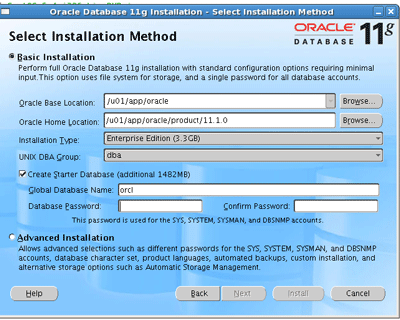
Select the product you want to install (default oracle 11g)

Select the installation method advanced Installation

Select the Enterprise Option

Install location

Prerequisite Checks

Update existing database to "No"

Install Software only

OS privileged groups

Installtion Summary

Progress Screen

Finish the instllation
     
Upgrade:

set the enviroment variables to point new Oracle 11g Home
(ORACLE_HOME, ORACLE_SID,LD_LIBRARY_PATH,PATH and CLASS_PATH)

start the 11g Home database listner
(Please take the backup before starting the upgrade process)

to start the upgrade process enter the follwing command
$dbua


Introduction Screen

Review or select the database for upgrade

Dump Location (like udump, cdump and bdump locations)

Keep the default selection

Flsh recovery locations

Uncheck the invlid object compilation during upgrade (you can do this after finish the installation)

If you didn't taken backup, then this is the last chance to take the bakup

Upgrade progress

You can safely ignore this message (This issue is tracked with Oracle bug 6322672.)

You can safely ignore this message (These errors do not result in any data loss. Therefore, you can ignore these errors. This issue is tracked with Oracle bug 6705429.)

Finish the upgrade now.

Now we will compile all invalid objects in the database using the follwing command:
$sqlplus / as sysdba
SQL>@$ORACLE_HOME/rdbms/admin/utlrp

After the upgrade process you should set the COMPATITBLE Initialisation parameter to 11.0.0

If you are using SPFILE then use the follwing command
$sqlplus / as sysdba
SQL>ALTER SYSTEM SET COMPATIBLE = '11.0.0' SCOPE=SPFILE;

shutdown and restart the database

if you are using pfile instead of spfile then
shutdown the database  and edit the initialisaion parameter file (initXXX.ora)
COMPATIBLE = 11.0.0
start the database